Search & privacy
What transcript indexing stores, how to turn it on, and what never leaves your machine.
Cost and token analytics never need the text of a conversation. Argus therefore keeps transcript text out of its database unless you turn indexing on. This page covers what indexing stores, the two ways to enable it, and the guarantees that hold either way.
What indexing stores
When indexing is on, every content block of a transcript becomes one row in a transcript_segments table with an FTS5 full-text index:
| Role | Source |
|---|---|
user | Your messages inside a session |
assistant | Claude's replies |
thinking | Extended-thinking blocks |
tool_result | Tool output, for example what a file read or a shell command returned |
Each segment is capped at 16 KB, so a huge build log does not bloat the index. Prompts from ~/.claude/history.jsonl are stored separately, capped at 8 KB, regardless of the indexing flag.
Indexing also feeds two dashboard features that otherwise stay empty: the Task given panel on the Sub-agents tab, which is the first user message sent to a sub-agent, and the inline error text under failing tool calls in the session Timeline.
Search returns nothing while indexing is off
The Transcripts page says only your prompts remain searchable when indexing is off. In practice the search endpoint returns zero results of every kind, prompts included, until you enable indexing.
Turning it on
Two paths, with one important difference.
From the dashboard. Settings → Enable indexing. This flips the flag and immediately starts a background backfill over sessions that have no segments yet, up to 1,000 at a time. Settings shows backfilling 120/682 while it runs.
From the terminal. argus indexing enable flips the flag only, then prints:
Enabled. Run `argus start` to backfill — historical sessions will
index in the background. New sessions are indexed automatically.
The backfill then happens on the next argus start or argus daemon restart, 200 sessions per run. Sub-agent transcripts are re-read together with their parent so that "Task given" fills in.
After enabling, sub-agent task text and inline tool errors for older sessions may appear only after a restart or two, because of the 200-session cap per run.
Turning it off, or clearing it
| Action | Effect |
|---|---|
Settings → Disable indexing, or argus indexing disable | The flag goes off. Segments stay on disk but every search and transcript endpoint returns empty |
Settings → Clear indexed data, or argus indexing clear | Deletes every segment, then compacts the database and reports the space freed. Leaves indexing off |
Clearing does not touch prompts, sessions, turns or tool calls. The Settings confirmation says so: "Delete all indexed transcript segments? Your prompts and sessions are unaffected."
The flag itself is a single row in the database. On a database where it was never set, the first read defaults to on if segments already exist and off otherwise.
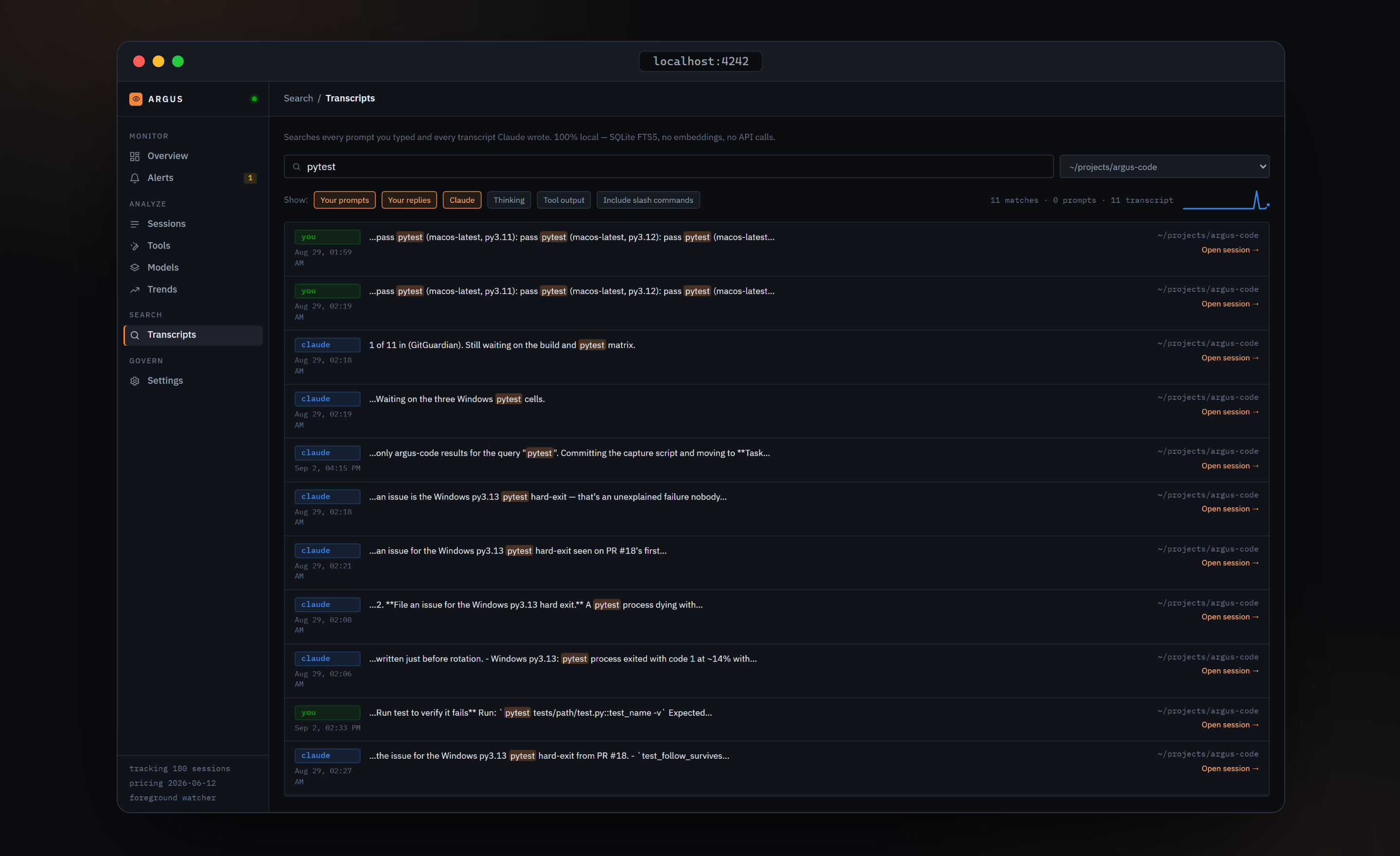
How search works
- Ranking is BM25 over an inverted index. There are no embeddings and no vector database.
- Queries need at least 2 characters and run 250 ms after you stop typing.
- Role chips choose what to search. Your prompts, Your replies and Claude are on by default; Thinking and Tool output are off.
- Slash commands like
/commitare excluded from prompt results unless you toggle Include slash commands. - At most 200 results are returned per query.
- Matches are highlighted from FTS5 snippets. The highlight markup is split into text runs, never injected as HTML.
What never leaves your machine
- Loopback only. The server binds
127.0.0.1. Nothing on your LAN, Wi-Fi or VPN can reach it.--host 0.0.0.0exists and prints a loud warning. - One network call, and only when you ask.
argus pricing refreshfetches a single JSON file from LiteLLM's GitHub repository. Nothing else in Argus makes an outbound request. There is no telemetry, no analytics, and no call to any language model. - Three guards on top of loopback binding. Every non-GET request must carry an
Originheader that exactly matches the dashboard's own origin, otherwise it gets a 403. Every request must carry a loopbackHostheader, otherwise it gets a 421, which defeats DNS rebinding. No CORS headers are ever emitted, so a page on another origin cannot read responses. - No authentication. Loopback binding is the security model. If you bind a LAN address, anyone on that network can read your prompt history, transcripts and project paths.
- Transcript text never becomes HTML. Every string derived from a transcript renders as plain text, and a test in the repository enforces that.
Verified against argus-code 0.5.2.