Sessions
The session grid, filters, the duration × tokens scatter, and CSV export.
Every session you have ever run, at /sessions. Reach it from the sidebar, Ctrl+K, or the "All sessions" link on Overview.
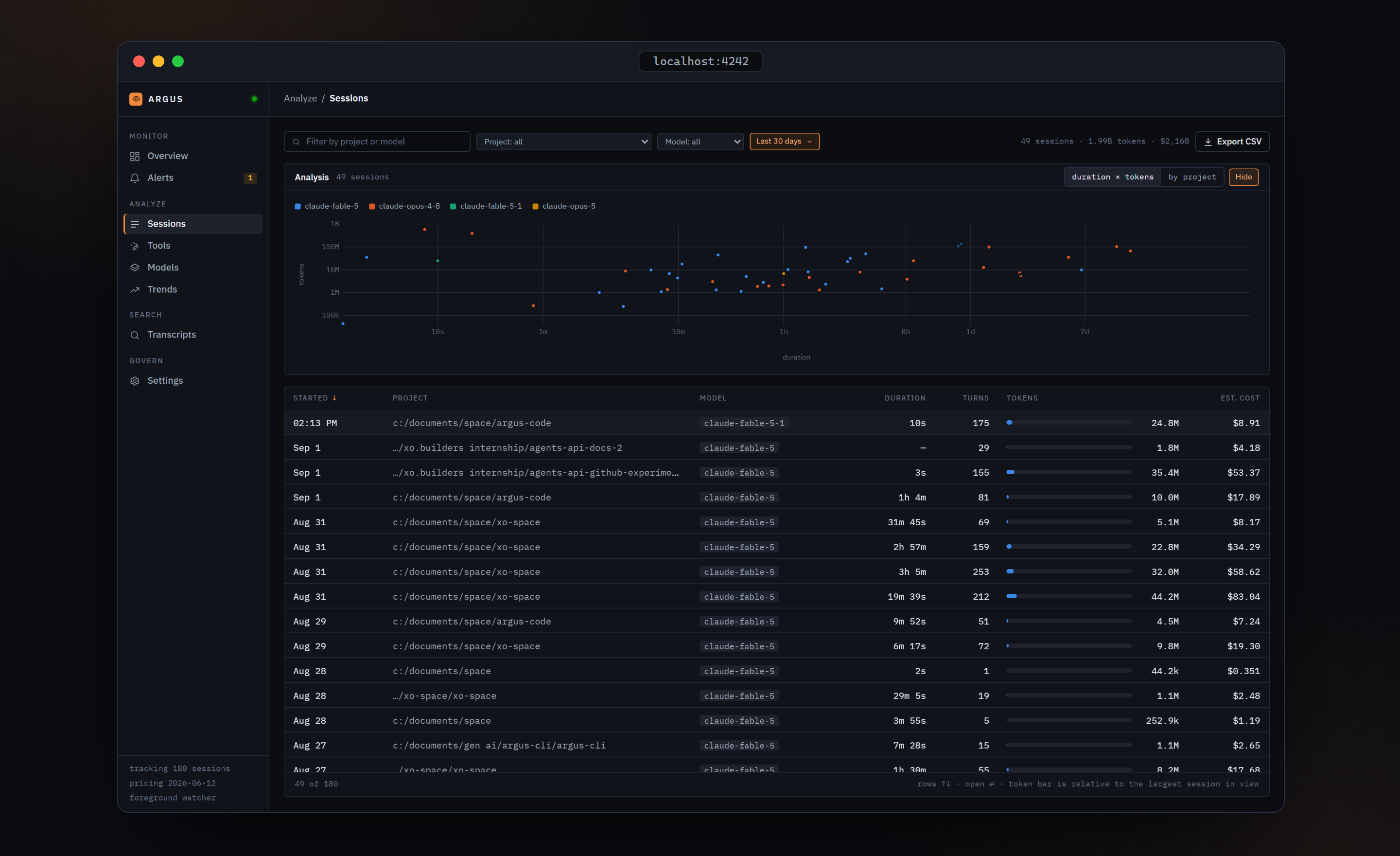
The filter row
- Text box, "Filter by project or model". It also matches the session id, case-insensitively.
- Project dropdown, every distinct project path.
- Model dropdown.
- Window chip. Click it to cycle Last 24h → Last 7 days → Last 30 days → All time. The default is Last 30 days. This filter goes by session start date in local calendar days.
- Has errors chip, shown only when at least one session recorded a tool error.
- A summary on the right:
49 sessions · 1.99B tokens · $2,168, summed over the filtered rows. - Export CSV, which downloads every session with these columns: id, agent, started_at, ended_at, project_path, primary_model, total_cost_usd, total_fresh_input_tokens, total_output_tokens, turn_count. Cache tokens and duration are not in the CSV. Sub-agent rows and empty sessions are excluded.
Analysis
A panel above the grid, open by default, with a Hide chip. Two views:
duration × tokens. One point per session with a duration above zero. The x-axis is duration on a log scale from seconds to a week; the y-axis is all tokens on a log scale. Colour is the primary model, at most five plus Other, with a legend when there are two or more. Hover a point for the project, date, duration, tokens, cost and turn count. Outliers, the sessions that ran long or burned far more than their neighbours, sit alone at the edges.
by project. Horizontal bars of tokens for the top 12 projects. The Table toggle lists every project with sessions, tokens and estimated cost.
The grid
| Column | Content |
|---|---|
| STARTED | Short date, or the time if today. Default sort, newest first |
| PROJECT | Shortened path; hover for the full path |
| MODEL | The primary model, meaning the one with the most fresh input plus output tokens |
| DURATION | Formatted duration. A session that is still running shows a green live pill |
| TURNS | Number of assistant turns |
| ERRORS | ✕ 3 in red when tool calls failed, a muted 0 otherwise |
| TOKENS | A bar relative to the largest session currently in view, and the value |
| EST. COST | Estimated cost |
Click a header to sort; the active sort shows an orange arrow. Arrow keys move between rows and Enter opens one. Clicking a row opens the session on its Overview tab. The list is virtualised, so thousands of sessions scroll smoothly.
The footer reads 49 of 180 on the left and, on the right, a reminder that the token bar is relative to the largest session in view.
What a session is
One transcript file under ~/.claude/projects/ is one session. Its project path is the working directory of its first assistant message. A session resumed with claude --resume appends to the same file, so it stays one row. Sub-agents spawned by a session are stored as their own rows internally but rolled into the parent's totals, and they never appear in this list; open the parent and use its Sub-agents tab.
Verified against argus-code 0.5.2.